
When a Nerves application needs a board-specific driver, pinmux arrangement, or device-tree change, the application is often the wrong place to solve the problem. The change belongs in the Nerves system: the part of the firmware that defines the bootloader, Linux kernel, device tree, root filesystem, and cross toolchain.
This guide walks through the approach used by `pp_custom_bbb`, a custom BeagleBone system based on `nerves_system_br`. The motivating example is a 3.5-inch ILI9488 LCD and ADS7846 touch controller connected over SPI. The standard `nerves_system_bbb` system provides a strong baseline, but it does not contain every board-specific driver or hardware assumption. In this case, the system needed both a new DRM driver and a device-tree overlay that describes the actual wiring.
The important lesson is that a custom Nerves system is not a fork of the whole Linux source tree. It is a small, reproducible layer of configuration and patches applied to a known upstream kernel and bootloader source.
The stock BeagleBone system is designed to support a broad set of boards and common overlays. It is a good starting point when the hardware can be described using existing kernel drivers and existing device-tree files.
A custom system becomes appropriate when one or more of these are true:
For the ILI9488 example, the generic driver did not know which panel variant was connected. The local change adds a `panel-type` device-tree property. A `green` panel enables display inversion; other values use the non-inverted command. The overlay supplies that property along with the SPI, GPIO, backlight, rotation, and touch-controller configuration.
The stock BeagleBone system is designed to support a broad set of boards and common overlays. It is a good starting point when the hardware can be described using existing kernel drivers and existing device-tree files.
A custom system becomes appropriate when one or more of these are true:
For the ILI9488 example, the generic driver did not know which panel variant was connected. The local change adds a `panel-type` device-tree property. A `green` panel enables display inversion; other values use the non-inverted command. The overlay supplies that property along with the SPI, GPIO, backlight, rotation, and touch-controller configuration.
					pp_custom_bbb/
  nerves_defconfig
  linux/
    0001-rcn-linux-5.10.162-ti-r59.patch
    0002-squashfs-provide-backing_dev_info-in-order-to-disabl.patch
    0003_lcd_display.patch
    0004_lcd_panel_type_support.patch
    linux-5.10.defconfig
  package/extra-dts/
    extra-dts.mk
    BB-LCD-ILI9488-ADS7846.dts
    BB-LCD-ILI9488-ADS7846-1.dts
  uboot/
    ...
  docs/
					# pp_nerves_app/apps/pp_scenic/mix.exs
defp deps do
  [
    {:elixir_make, "~> 0.7.7", override: true, runtime: false},
    {:nerves, "~> 1.11.1 or ~> 1.12", runtime: false},
    {:shoehorn, "~> 0.9", targets: @all_targets},
    {:nerves_runtime, "~> 0.13.9"},
    {:nerves_pack, "~> 0.7", targets: @all_targets},
    {:toolshed, "~> 0.4", targets: @all_targets},
    {:scenic, "~> 0.11.2"},
    {:chisel, "~> 0.2"},
    {:pp_scenic_touch, in_umbrella: true}
  ]
end
					defmodule PpNervesApp.MixProject do
  use Mix.Project

  def project do
    [
      apps_path: "apps",
      version: "0.1.0",
      start_permanent: Mix.env() == :prod,
      deps: deps()
    ]
  end

  defp deps do
    [
      {:pp_custom_bbb,
       path: "../pp_custom_bbb",
       override: true,
       runtime: false,
       targets: :pp_custom_bbb}
    ]
  end
end
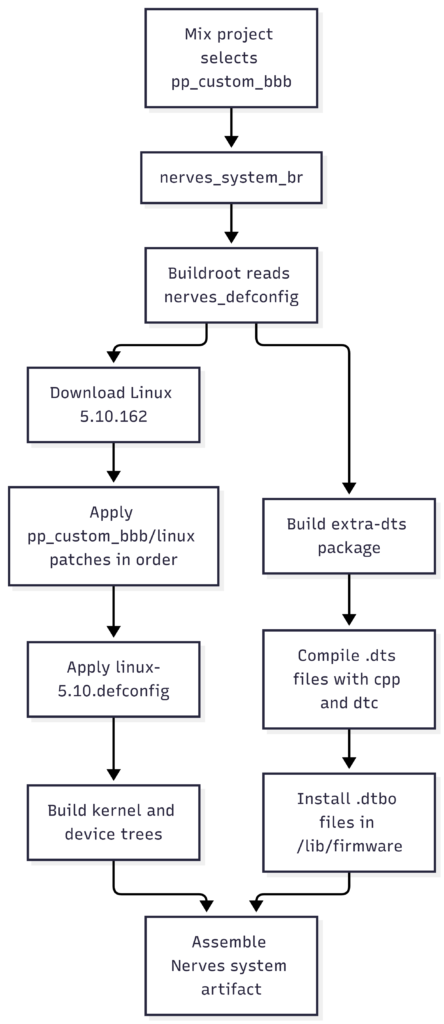
					BR2_LINUX_KERNEL=y
BR2_LINUX_KERNEL_CUSTOM_TARBALL=y
BR2_LINUX_KERNEL_CUSTOM_TARBALL_LOCATION=".../linux-5.10.162.tar.gz"
BR2_LINUX_KERNEL_PATCH="${NERVES_DEFCONFIG_DIR}/linux"
BR2_LINUX_KERNEL_USE_CUSTOM_CONFIG=y
BR2_LINUX_KERNEL_CUSTOM_CONFIG_FILE="${NERVES_DEFCONFIG_DIR}/linux/linux-5.10.defconfig"
Nerves_system_build
`BR2_LINUX_KERNEL_PATCH` tells Buildroot to apply every patch in the directory to the extracted kernel source. The numbered names are intentional: they make the order visible and ensure that foundational changes happen before changes that depend on them.
The custom system also sets `BR2_TARGET_UBOOT_PATCH` to the local `uboot` directory. Kernel patches and U-Boot patches follow the same general pattern, but they are applied to different source trees.
					cd pp_custom_bbb
mix deps.get
mix compile
mix nerves.artifact
The safest patch-generation workflow is to compare two complete copies of the same kernel baseline:
For a single-file change such as the ILI9488 driver, the repository uses this form of command:
					diff -uN -b \
  --label "a/drivers/gpu/drm/tiny/ili9488.c" \
  --label "b/drivers/gpu/drm/tiny/ili9488.c" \
  "$ORIGINAL/drivers/gpu/drm/tiny/ili9488.c" \
  "$MODIFIED/drivers/gpu/drm/tiny/ili9488.c" \
  > pp_custom_bbb/linux/0004_lcd_panel_type_support.patch
For larger changes, a Git-based workflow is usually easier to review:
					cd /path/to/linux
git diff --no-ext-diff -- drivers/gpu/drm/tiny/Kconfig \
  drivers/gpu/drm/tiny/Makefile \
  drivers/gpu/drm/tiny/ili9488.c \
  > /path/to/pp_custom_bbb/linux/0003_lcd_display.patch
Whichever method is used, inspect the patch before committing it. Confirm that it contains only the intended files, that paths are relative to the kernel root, and that the old side really matches the configured kernel version.
The first patch in this system is a converted RCN/TI kernel patch. The helper `linux/update-kernel-patch.sh` documents the conversion process:
That conversion is useful because Buildroot expects a patch it can apply to the kernel source it extracted. It also records exactly which vendor patch release was used. If the kernel version changes, regenerate or replace this baseline patch rather than assuming that an old diff will continue to apply.
Not every hardware change belongs in a kernel patch. The repository uses two different mechanisms:
`0003_lcd_display.patch` adds the ILI9488 driver and registers it in the tiny DRM driver’s `Kconfig` and `Makefile`. `0004_lcd_panel_type_support.patch` extends that driver to read `panel-type` from firmware properties and select the appropriate inversion command.
These changes alter kernel source and are compiled into the kernel or a kernel module. They must be rebuilt whenever the kernel source or configuration changes.
The matching kernel configuration must also enable the required pieces, such as DRM, SPI, MIPI DBI, and the ILI9488 driver. Adding a source file without adding its Kconfig and Makefile entries leaves the code out of the build.
`package/extra-dts/BB-LCD-ILI9488-ADS7846.dts` describes the board wiring. It:
The `extra-dts` Buildroot package preprocesses each `.dts` file with the kernelinclude paths, compiles it with the host `dtc`, and installs the resulting `.dtbo` files into `/lib/firmware`:
					(CPP) -I$(@D) -I $(LINUX_SRCDIR)include -I $(LINUX_SRCDIR)arch \
  -nostdinc -undef -D__DTS__ -x assembler-with-cpp $$filename | \
  $(HOST_DIR)/usr/bin/dtc -@ -I dts -O dtb -b 0 \
  -o $${filename%.dts}.dtbo
This separation keeps hardware wiring in an overlay while keeping driver logic in the kernel patch. It also makes it possible to update an overlay without duplicating a complete board device tree.
Apply the patch to a clean source:
The strongest early test is a clean system build. A patch that works only in an already-used artifact directory is not reproducible. Remove or invalidate the kernel build output as appropriate for the local Nerves workflow, then rebuild the system artifact.
Inside the generated artifact, verify that:
					dmesg | grep -i -E 'ili9488|drm|spi|ads7846'
cat /proc/device-tree/soc/48030000.spi/display@0/panel-type
ls -l /lib/firmware/*.dtbo
The exact device-tree path can vary with the board’s compiled tree, so searching under `/proc/device-tree` may be necessary. The driver logs its selected panel type, which is particularly useful for distinguishing a missing property from a panel that simply needs different initialization commands.
Usually the patch was generated against a different kernel revision, or a previous patch changed the same context. Check the configured tarball, patch ordering, and the file paths in the patch header. Regenerate the patch against the exact baseline instead of hand-editing context until it applies.
Check all of the layers: the driver must be present in the source tree, enabled by Kconfig, built by the Makefile, and described by a matching device-tree `compatible` string. For the example here, the overlay must use `compatible = “ilitek,ili9488″` and the SPI node must be enabled.
Disabling only the UART device may not be enough. The overlay also disables the UART pinctrl node and conflicting universal-I/O pinmux entries before applying the SPI pin configuration.
The overlay build needs the kernel’s device-tree headers and a host `dtc`. That is why `extra-dts.mk` depends on `host-dtc` and passes both the Linux `include` and `arch` directories to the preprocessor. A standalone `dtc` command may succeed while the Nerves package still fails if those include paths are missing.
Patch files are tied to a kernel version and surrounding source context. Record the kernel version, vendor patch revision, purpose, and hardware validation in the commit or a nearby document. Treat a kernel upgrade as a patch-maintenance task, not just a version-number edit.
Keeping a local custom system is often the fastest route when hardware is under active development or the change is specific to one product revision. It gives the team control over the kernel version, patch order, overlay contents, and release cadence.
The cost is ongoing maintenance:
Upstreaming is usually the better long-term choice for generally useful driver behavior, standard device-tree bindings, or support that benefits multiple boards. Upstream work has a higher initial cost: the driver needs a documented binding, reviewable history, coding-style cleanup, and compatibility with the kernel APIs and maintainers’ expectations. Once accepted, however, it reduces the private patch surface and makes future Nerves system upgrades easier.
A practical decision rule is:
| Change | First choice |
|---|---|
|
Product-only wiring or pin assignments |
Keep it in a board overlay |
|
A generic driver bug or reusable feature |
Prepare an upstream kernel change |
|
A temporary hardware experiment |
Keep a clearly named local patch |
|
A new standard device-tree property |
Upstream the binding and driver support |
|
A vendor baseline required by the board family |
Track it as a versioned system patch |
| Table Header | Table Header | Table Header | Table Header |
|---|---|---|---|
|
Content |
Content |
Content |
Content |

Packet Path is your gateway to innovative IoT solutions. At Packet Path, we are dedicated to revolutionising the IoT industry by creating innovative and user-friendly IoT products and services
8 Responses
test comment